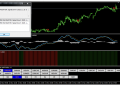

The Trade Like A Boss Trading System For MT4 is a complete trading package with multiple indicators and trading conditions to get the exact price outlook in any currency pair.
In the following section, we will see how to trade like a boss with this strategy and manage the bullish and bearish with appropriate trade management rules.
The Trade Like A Boss Trading System For MT4
In this strategy, we will follow the system that usually a boss does. Indicators will provide trading direction, and we will confirm the decision by observing trading conditions (like a boss).
Let’s have a look at trading tools in this system:
- SSL Fast- H1 and H4
- Dynamic S/R
- Synergy Trade Signal
- XPS V8
Every indicator has sub-functions, as indicated in the image below:
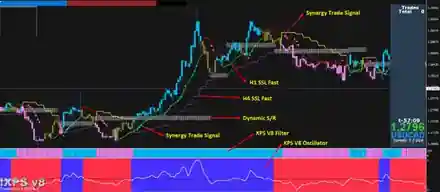
In the following section, we will see how these indicators read the price.
SSL Fast
This indicator is like the traditional moving average that shows the price direction by appearing above or below the candlestick.
However, the MA and SSL’s main difference is that the SSL Fast provides more accurate results by using some complex calculations.
In this strategy, there are two SSL indicators- for H4 and H1.
Moreover, SSL Fast has a color-changing feature to get the price direction easily. If you put the cursor on the indicator line, it would show the summary in a box. The summary includes the timeframe, value, and time.
Overall, we aim to take buy trade if the price moves above the SSL fast level. Similarly, we intend to take sell trades when the price moves below the SSL Fast.
Dynamic S/R
This indicator shows the horizontal support and resistance zones in the price. The difference between the traditional static support- resistance and the Dynamic S/R is that the Dynamic S/R is more accurate, and it changes the position with the price action.
Therefore, traders can get more accurate and reliable price direction with this tool. However, in this strategy, we will take buy trades when this zone is below the price and will take sell trades when it is above the current price.
Synergy Trade Signal
It is a buy and sell arrow showing above or below the price to indicate where to enter the trade. However, we will ensure multiple confirmations rather than relying on the trade signal only in this strategy.
XPS V8
It is the most important indicator in this system that has multiple functions as discussed below-
- XPS V8 Filter provides the market direction with a vertical histogram. When the Histogram’s color changes from blue to pink, the market sentiment is bearish. Later on, when the color changes from pink to blue, the market sentiment is bullish.
- XPS V8 Oscillator provides price direction when the white line crosses the horizontal black line. If the crossover happens upside, the market sentiment is bullish. Similarly, if the crossover happens downside, the market sentiment is bearish.
Overall, in this strategy, the perfect trading entry appears when all indicators provide the same price direction in both the bullish and bearish markets.
Bullish Trading System
You can use the Bullish Trade Like A Boss Trading System For MT4 in any currency pairs, including gold and US Oil.
This strategy’s percent timeframe is h1 as it can complete all trading activities within the trading day. Moreover, if you move to a higher timeframe, you can get more accurate results.
Conditions
- Price is above H4 SSL Fast.
- Price is above the Dynamic S/R
- XPS V8 Filter’s color changes from pink to blue
- In the XPS V8 Oscillator, the white line moves above the black line.
- Price moves above the H1 SSL Fast.
- Finally, the Synergy Trade Singal has appeared in the price.
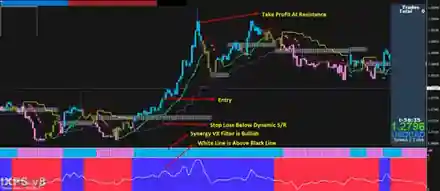
Entry
Before taking the trade, make sure that all trading conditions are valid. After that, wait for a bullish H1 candle above the H1 SSL Fast and open the trade after the closing candle.
Stop Loss
If you are very aggressive in trade management, you should put the stop loss below the Synergy trade signal. This method is risky and requires monitoring.
However, you should set the stop loss below the dynamic support level with a gap of 10 pips for a conservative approach.
Take Profit
While taking the profit, make sure to follow these rules-
- If the dynamic white lines move to the overbought zone, consider the trend as corrective.
- Bearish Synergy Trade Signal appears in the price.
- The price moved to an important Dynamic Resistance level.
If any two of the conditions meet, close the trade and make sure to move the stop loss at breakeven after breaking the recent high.
Bearish Trading System
The Bearish Trade Like A Boss System applies to any currency pairs from the forex market, including gold and US Oil.
This strategy’s percent timeframe is h1 as it can complete all trading activities within the trading day. Moreover, if you move to a higher timeframe, you can get more accurate results.
Conditions
- The price is below H4 SSL Fast.
- Price is below the Dynamic S/R
- XPS V8 Filter’s color changes from blue to pink.
- In the XPS V8 Oscillator, the white line moves below the black line.
- Price moves below the H1 SSL Fast.
- Finally, the Synergy Trade Singal has appeared above the price.
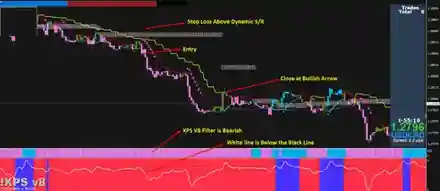
Entry
After confirming all conditions, wait for a bearish H1 candle below the H1 SSL Fast and open the trade after the candle closes.
Stop Loss
The aggressive approach is to put the stop loss above the Synergy trade signal.
However, for a conservative approach, you should set the stop loss above the dynamic resistance level with a gap of 10 pips.
Take Profit
While taking the profit make sure to follow these rules-
- The white dynamic lines move to the oversold zone.
- Bullish Synergy Trade Signal appears below the price.
- The price moved to an important Dynamic Support level.
If any two of the conditions meet, close the trade and make sure to move the stop loss at breakeven after breaking the recent low.
Summary
Let’s summarise The Trade Like A Boss Trading System For MT4:
- This Trading System For MT4 is a complete trading package that can take your trading one step ahead.
- This method works well in all timeframe, but the ideal timeframe is H1.
- Confirm 6 conditions in all trades before taking the entry.
- Set the stop loss below or above the Dynamic S/R and close the trade when any two opposite signals appear in the chart.